> ## Documentation Index
> Fetch the complete documentation index at: https://docs.sx.bet/llms.txt
> Use this file to discover all available pages before exploring further.
# Deposit By Transferring Crypto
> Learn how to deposit USDC on SX Bet by transferring crypto from your wallet or exchange.
 What exchange you will use depends on your location, but some popular crypto exchanges include Coinbase, Kraken, Crypto.com, and Binance.
We'll run through these steps using Coinbase, but you'll find most crypto exchanges have a similar layout.
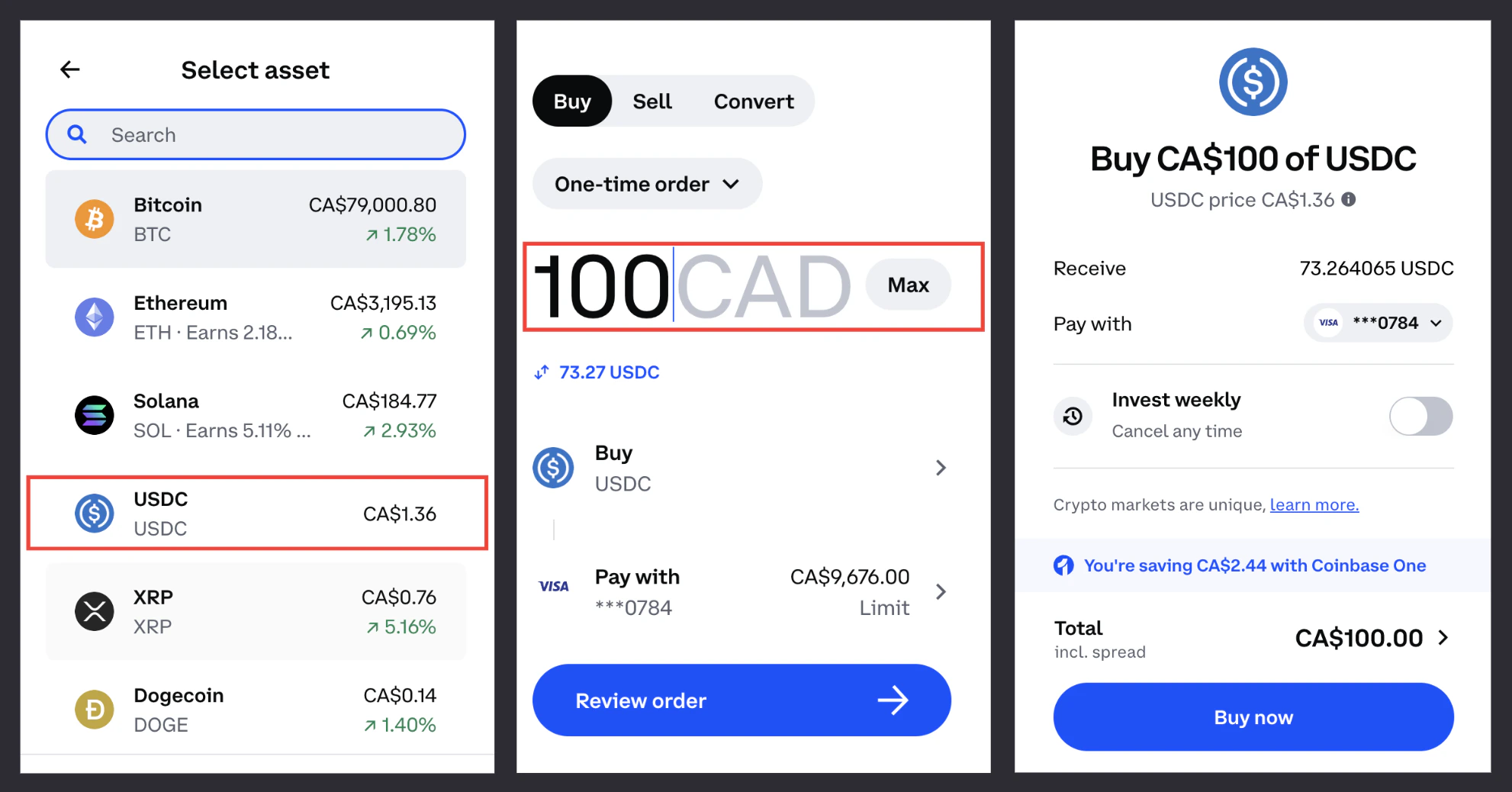
1. Sign up or log in to [Coinbase](https://login.coinbase.com/) (or another crypto exchange) — click on "Buy", select USDC and input the amount you'd like to purchase. Confirm the transaction and payment details.
What exchange you will use depends on your location, but some popular crypto exchanges include Coinbase, Kraken, Crypto.com, and Binance.
We'll run through these steps using Coinbase, but you'll find most crypto exchanges have a similar layout.
1. Sign up or log in to [Coinbase](https://login.coinbase.com/) (or another crypto exchange) — click on "Buy", select USDC and input the amount you'd like to purchase. Confirm the transaction and payment details.
 **Now you have USDC!**
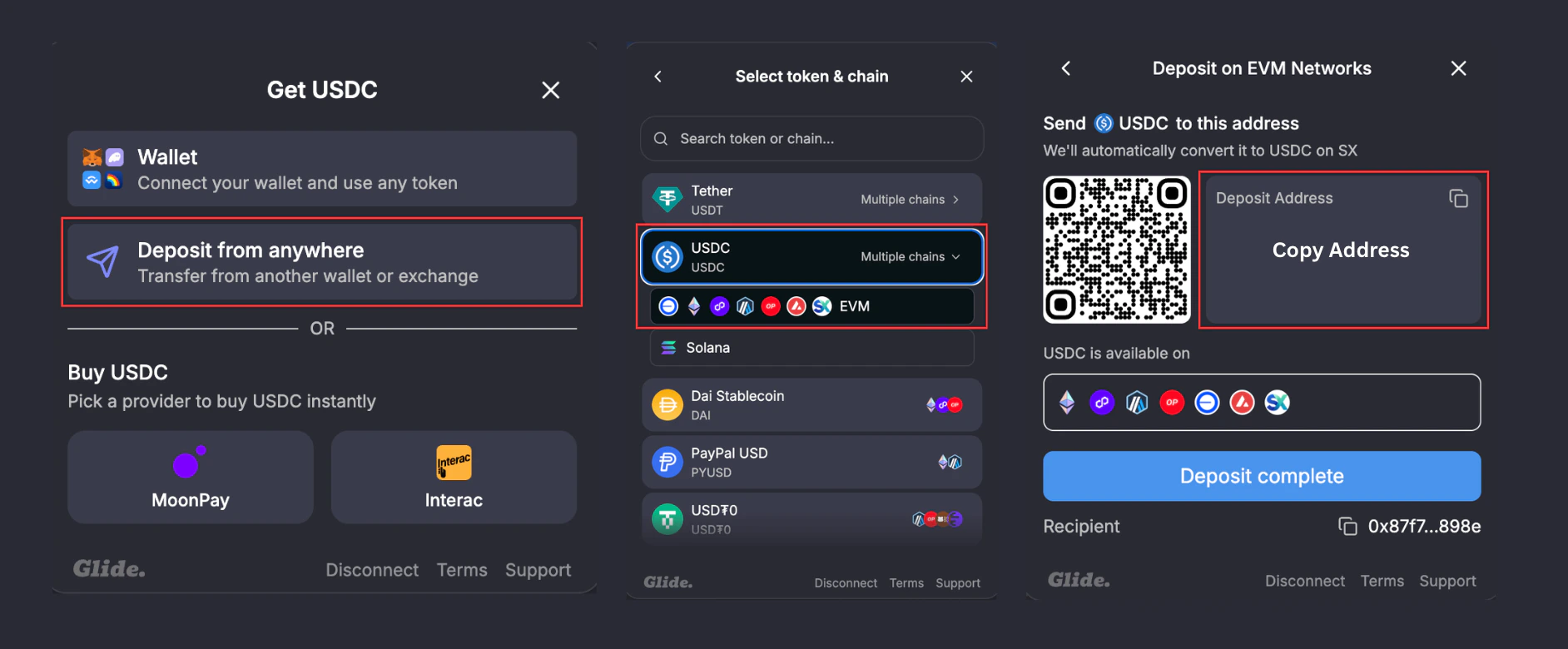
2. Login to SX Bet — click "Deposit" and select the "Deposit from anywhere" option. Choose USDC and copy the address.
**Now you have USDC!**
2. Login to SX Bet — click "Deposit" and select the "Deposit from anywhere" option. Choose USDC and copy the address.
 3. Head back to your [Coinbase](https://login.coinbase.com/) account (or other crypto exchange) and click "Send", paste in your SX Bet Deposit Address, and the amount you would like to send.
You **can keep the default setting as Ethereum Network** or choose Arbitrum, Optimism, Base, Avalanche or Polygon.
3. Head back to your [Coinbase](https://login.coinbase.com/) account (or other crypto exchange) and click "Send", paste in your SX Bet Deposit Address, and the amount you would like to send.
You **can keep the default setting as Ethereum Network** or choose Arbitrum, Optimism, Base, Avalanche or Polygon.
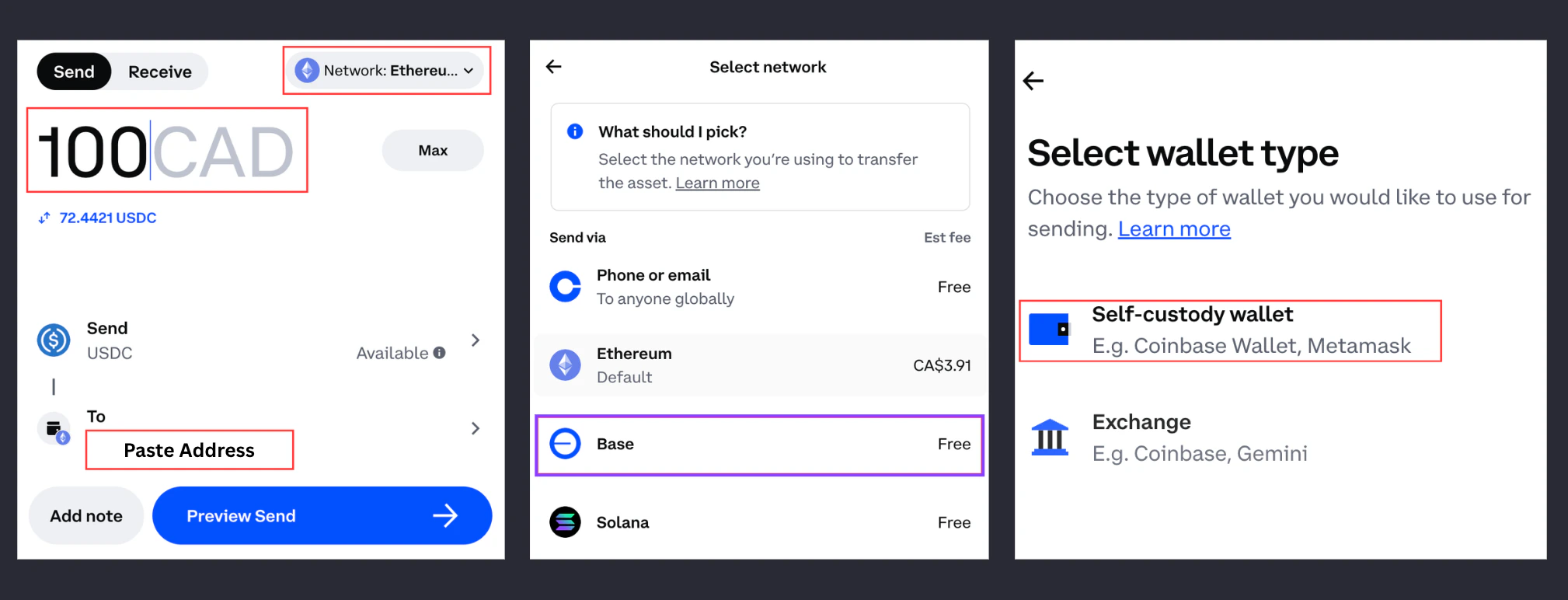 4. Select self-custody wallet — both MetaMask and email (Fortmatic) are self-custody wallets, meaning you stay in control of your funds. Confirm the transaction.
5. Your USDC will appear in your SX Bet wallet.
6. Now you can start betting!
### FAQ
Yes — a fresh transfer address is generated each time you deposit. Sending funds to the address you were provided for a previous deposit will cause a delay in your deposit. Only transfer your funds to the deposit address provided for this specific session.
No — deposits made with Native USDC have 0% fees. Deposits made with any other token (e.g. BTC, ETH, USDT) are subject to a 0.33% fee. If you're unsure how to get Native USDC, open a support chat on [SX Bet](https://sx.bet).
We support deposits with 100+ tokens across 10+ blockchain networks. To see the full list of supported tokens:
1. Select **Deposit** > **Deposit from anywhere**
2. Use the dropdown menu to browse available tokens and chains.
If your deposit is taking longer than expected, please open a support chat on [SX Bet](https://sx.bet/) or contact our payments provider (Glide) directly by emailing [support@paywithglide.xyz](mailto:support@paywithglide.xyz).
Bet at the best available odds and get matched instantly.
Learn how to find odds and navigate the live order book.
4. Select self-custody wallet — both MetaMask and email (Fortmatic) are self-custody wallets, meaning you stay in control of your funds. Confirm the transaction.
5. Your USDC will appear in your SX Bet wallet.
6. Now you can start betting!
### FAQ
Yes — a fresh transfer address is generated each time you deposit. Sending funds to the address you were provided for a previous deposit will cause a delay in your deposit. Only transfer your funds to the deposit address provided for this specific session.
No — deposits made with Native USDC have 0% fees. Deposits made with any other token (e.g. BTC, ETH, USDT) are subject to a 0.33% fee. If you're unsure how to get Native USDC, open a support chat on [SX Bet](https://sx.bet).
We support deposits with 100+ tokens across 10+ blockchain networks. To see the full list of supported tokens:
1. Select **Deposit** > **Deposit from anywhere**
2. Use the dropdown menu to browse available tokens and chains.
If your deposit is taking longer than expected, please open a support chat on [SX Bet](https://sx.bet/) or contact our payments provider (Glide) directly by emailing [support@paywithglide.xyz](mailto:support@paywithglide.xyz).
Bet at the best available odds and get matched instantly.
Learn how to find odds and navigate the live order book.